Software documentation with AI
Meet Code Analysis: AI software documentation, from sources to manuals
Your system’s knowledge is spread across conversations, databases and screens. Bring it together and turn it into documentation people can use.
 By Alexandre MelloFounder of Goalmoon6 min read
From scattered information to a shared understanding of your software.
Get to know the app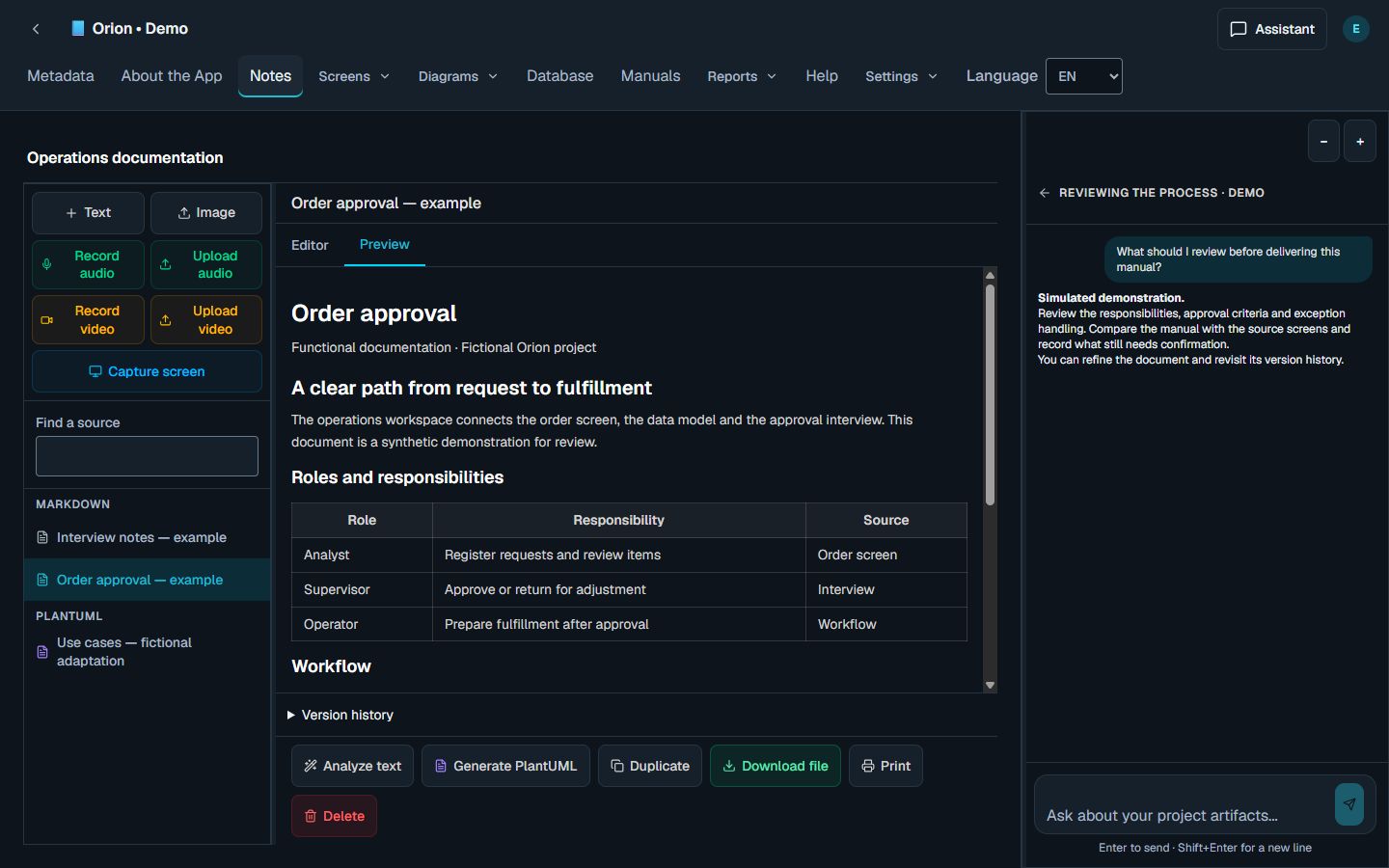
Every system has a story. Part of it is in the database. Part is on the screen. And much of it is still in the conversations of the people who use it.
What is Code Analysis?
Code Analysis is an AI-assisted application for systems analysis and software documentation. It brings interviews, notes, SQL scripts and screenshots into projects, helping you turn source material into documents, diagrams and manuals you can review and edit.
Think about understanding a system that is already in use. Someone explains the process in an interview, the database reveals how information is structured, and the interface shows how the work happens. Each source answers part of the question. Code Analysis gives you a workspace to use them together.
It supports people who need to understand, explain or improve software: organize what is known, produce an initial document, then refine it with the people who know the business.
For people who need to understand a system and explain it
Systems and business analysts, implementation consultants, developers and documentation specialists face similar problems: scattered information, rules that live in people’s heads, and documents that need to keep up with the product.
Code Analysis can support requirements discovery, understanding an existing database, documenting screens and preparing procedures for training and daily operations. You can start small: one process, a group of tables or an important screen.
- For analysis: organize actors, goals, rules and questions that still need answers.
- For implementation: connect interview findings with the system’s data and screens.
- For documentation: build material that other people can consult, review and use in their daily work.
From interviews to use cases and diagrams
An interview often mixes goals, steps, exceptions and operational details. Bring that material into a project, then use AI to organize the analysis and build diagrams with editable PlantUML source.
For use cases, the task is to identify who interacts with the system and what each person needs to accomplish. Activity diagrams help discuss a flow; sequence diagrams describe interactions; other formats explore structure and architecture. The solutions library introduces the available types.
The diagram is a way to have a more precise conversation. Check whether the actors make sense, whether an exception is missing and whether the described behavior matches actual operations. The PlantUML source remains available for editing and export.
In a fictional order process, an analyst registers a request and a supervisor approves it or returns it for changes. These goals become separate use cases, associated with the appropriate actors.
From SQL to a data dictionary and database relationships
When database documentation is incomplete, a SQL script is a useful starting point. In Code Analysis, you can use that structure to produce a data dictionary and relational diagram source, then develop the analysis in the context of your project.
Tables, fields and relationships help explain where information lives and how it connects. Basic structural extraction comes from parsing SQL. Understanding its business meaning benefits from interviews, recorded rules and an analyst’s review.
A column named status does not explain when an order can be approved. The database structure and the operational account complement each other: document what is explicit and identify what still needs confirmation.
Customer, order and item may be related in the SQL. An interview helps clarify who creates an order, what each status means and when its items can change.
From screens to documentation that guides people
A screen captures an important part of the user experience: fields, actions, messages and the organization of information. Code Analysis brings screenshots and functional documentation together, keeping the written explanation close to its visual reference during review.
To build a manual, select the relevant screens and connect them with interviews and project context. The document can then explain a complete task instead of simply listing fields.
The manual workflow includes consistency review. Check the relationship between sources and content, refine the result and follow its versions. Before delivery, validate the steps in the system you are documenting, especially permissions, messages and exceptions.
An approval manual can explain how to find an order, review its items, approve it or return it for changes, and check the outcome. Screens illustrate the steps; sources support the rules.
A chat assistant with your project’s context
The assistant can consult project modules, artifacts and reports, as well as create or update Markdown and PlantUML documents. You can continue your analysis in a conversation: ask for an explanation, explore a detail or revise existing content.
A useful question might be: “Compare this procedure with the sources and highlight what needs confirmation.” Or: “Organize these rules into a document for review.” Your question sets the task; your project sources provide context.
Code Analysis also lets you choose AI models by purpose from eligible, available options. Text, images and conversations can call for different capabilities. Review the estimate before authorizing an operation, then track consumption in your wallet.
Document changes can be followed through version history. Review an edit and restore a previous version when needed. AI helps produce and organize the material; people who understand the system validate its meaning.
“What is still missing from this manual, based on the sources in this project?”
Example prompt. The answer depends on the material selected and the model used.How to start with a real project
Choose a scope you can validate. Documenting a well-defined process is usually a more useful starting point than trying to describe an entire system at once.
- Create a project and gather sources you are authorized to use: notes, interviews, SQL and screenshots.
- Define the deliverable: understand a process, document a structure, build a diagram or prepare a manual.
- Select the relevant context and model, review the estimate and authorize the AI operation.
- Review the result alongside its sources. Correct interpretations, confirm rules and record open questions.
- Organize the deliverable and use supported exports, such as Markdown or DOCX documents and PlantUML source.
Understand usage, credits and data handling
Individual plans and their limits are listed on the plans page. AI operations and metered transfers use the same CodeCredits balance; the interface presents the relevant estimate or quote before authorization. The wallet brings together your balance, reservations and usage history.
To keep this guide useful as the offer evolves, prices, credit quantities, expiry and commercial terms stay on the website’s plans page. Consult those details when choosing a plan for your work.
Use sources you are authorized to process and read the privacy policy to understand provider processing, retention and deletion. When sharing documentation, also review the information included in screenshots and examples.
Review plans, limits and CodeCreditsTurn a concrete task into useful documentation
Think of a question that is currently hard to answer about your system: who can approve an operation, how two tables relate, or which steps someone needs to follow to complete a task. That question helps you choose the sources and define a document worth producing.
A useful result helps another person understand the process, find the information they need and see what still requires confirmation. In Code Analysis, you can work from SQL to data dictionaries, interviews to use cases, and screens to manuals, keeping the sources close to your analysis.
Explore the application’s examples, choose a workflow and define the first scope of your project. If you need help finding the workflow that fits your work, get in touch through support.
Explore Code Analysis examplesAlexandre tells the story behind Code Analysis on the Goalmoon blog, from interviews during a systems implementation to building the application.
Read the story on GoalmoonFounder of Goalmoon